
Category Archives: Use your designs

Wild Gears Rain Stick

A rainstick made from the bits of acrylic left over when unpacking Wild Gears. From Suze in Australia.
Continue reading →WildGears Multimedia with Watercolours

Spongepainting watercolour paper before drawing designs with Wild Gears to produce interesting multimedia artpieces. Leveling up.
Continue reading →Colouring Wild Gears Designs

I made some colouring pages with full-page Wild Gears patterns. I drew the designs in black ink, scanned them, cleaned them up in Photoshop and printed them off. Then the fun began. I have to say I was surprised at … Continue reading →
Making Cards with Spirograph or Wild Gears

Got spiro-skills? Use them to make unique, hand-drawn greeting cards with your Spirograph or Wild Gears.
Continue reading →Spirograph Rangoli Designs for Diwali?

A Spirograph fan in India, Dhaval Shah, sent me some pictures of rangoli patterns. These are designs made on the floor to welcome guests during festivals such as Diwali, the Hindu festival of lights, which starts in a week on … Continue reading →
Vintage Super Spirograph Booklet

I followed a link from the Wikipedia article on Spirograph to this user manual for Super Spirograph. It’s in French, Dutch and German. Thanks to Stephanie Molina who posted it on Scribd. It’s 39 pages of vintage goodness, including many … Continue reading →
Spirograph Cookies! Eat ’em if you dare.

How many Spirograph cookies would you eat? I’d never heard of edible markers, but apparently they exist. And Amber Spiegel, a cookie artist in Beacon NY is not afraid to use them with Spirograph! Here is her video. You can learn … Continue reading →
Spirotot Totally Mastered by Ariella Zwillinger
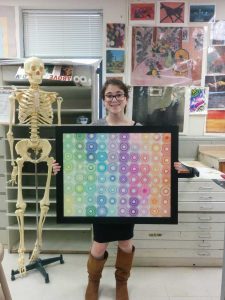
I don’t think many of the “tots” who ever used the old Spirotot toy – a basic version of Spirograph designed for smaller children – ever made patterns like this. It requires mastery not typical of 5-year-olds. Ariella Zwillinger from … Continue reading →